커맨드 패턴은 객체지향 디자인 패턴으로, 요청을 객체로 캡슐화하여 매개변수화된 메서드 호출, 메서드 실행을 취소할 수 있는 기능을 지원합니다. 캡슐화를 통해 재사용성을 높이고 클래스간의 의존성을 제거한다.
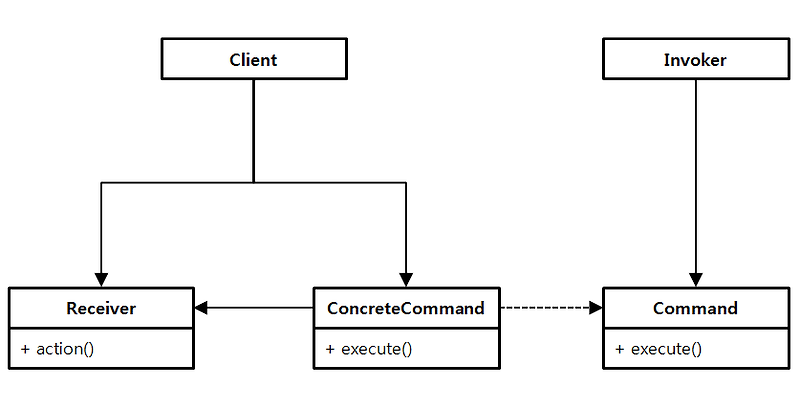
이 패턴은 요청을 발생시키는 호출자(Invoker), 명령을 받아서 수행하는 수신자(Receiver), 요청을 캡슐화하여 저장하는 커맨드(Command), 명령을 구현하는 구상 커맨드(ConcreteCommand), 구상 커맨드 객체를 만들고 설정하는 클라이언트(Client)로 구성된다.
- 호출자 (Invoker):
- 요청을 발생시키는 객체.
- 커맨드 객체를 생성하고 실행하는 역할.
- 수신자 (Receiver):
- 실제로 요청을 처리하는 객체.
- 커맨드 객체가 호출될 때 수행될 동작을 구현.
- 커맨드 (Command):
- 요청을 캡슐화하는 인터페이스.
- 실행할 메서드(Execute())와 필요한 경우 실행 취소할 메서드(Undo())를 정의.
- 구상 커맨드 (ConcreteCommand):
- 실제로 수신자 객체의 메서드를 호출하는 구체적인 커맨드 클래스..
- Command 인터페이스를 구현하며, 수신자 객체와 실행할 메서드를 포함.
- 클라이언트 (Client):
- 커맨드 객체를 생성하고, 호출자에게 제공하여 실행.
- 일반적으로 호출자와 수신자 객체를 생성하고, 구상 커맨드 객체를 만들어 호출자에게 전달.
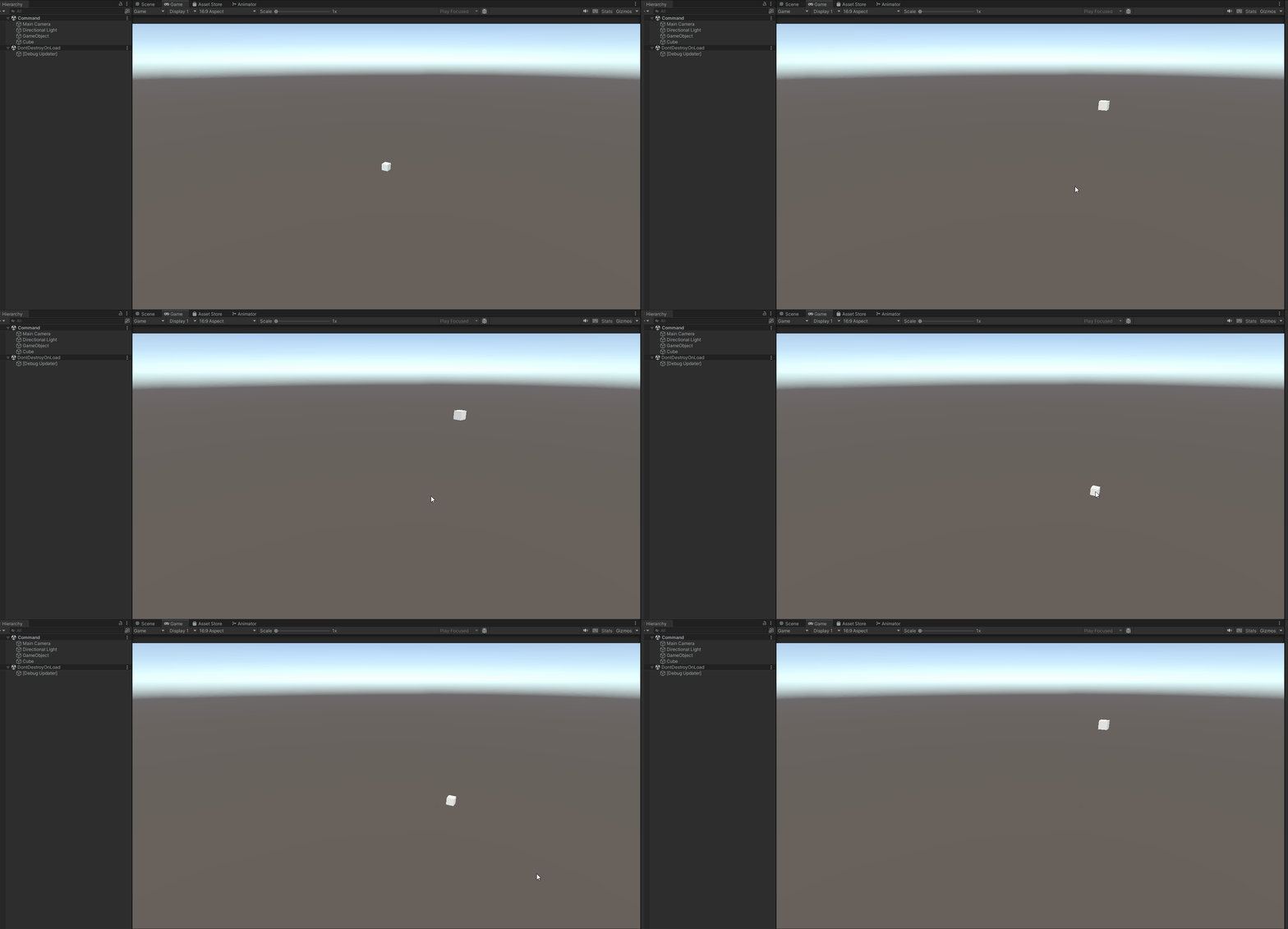
유니티에서 직접 활용해보자.
using System.Collections;
using System.Collections.Generic;
using UnityEngine;

public interface ICommand
{
    void SetOwner(GameObject go);
    void Excute();
    void Undo();

    void Redo();
}

public abstract class Command : ICommand
{
    protected GameObject Owner;

    public void SetOwner(GameObject go)
    {
        Owner = go;
    }
    public abstract void Excute();
    public abstract void Undo();

    public abstract void Redo();
}

public class MoveCommandX : Command
{
    private Vector3 movePosition = new Vector3(10, 0, 0);

    public override void Excute()
    {
        Owner.transform.position += movePosition;
    }

    public override void Undo()
    {
        Owner.transform.position += -movePosition;
    }

    public override void Redo()
    {
        Owner.transform.position += movePosition;
    }
}
public class MoveCommandY : Command
{
    private Vector3 movePosition = new Vector3(0, 10, 0);

    public override void Excute()
    {
        Owner.transform.position += movePosition;
    }

    public override void Undo()
    {
        Owner.transform.position += -movePosition;
    }

    public override void Redo()
    {
        Owner.transform.position += movePosition;
    }
}

public class MoveCommandZ : Command
{
    private Vector3 movePosition = new Vector3(0, 0, 10);

    public override void Excute()
    {
        Owner.transform.position += movePosition;
    }

    public override void Undo()
    {
        Owner.transform.position += -movePosition;
    }

    public override void Redo()
    {
        Owner.transform.position += movePosition;
    }
}

public class RotateCommandX : Command
{
    private float rotateAmount = 10f;

    public override void Excute()
    {
        Owner.transform.Rotate(Vector3.right, rotateAmount);
    }

    public override void Undo()
    {
        Owner.transform.Rotate(Vector3.right, -rotateAmount);
    }

    public override void Redo()
    {
        Owner.transform.Rotate(Vector3.right, rotateAmount);
    }
}

public class RotateCommandY : Command
{
    private float rotateAmount = 10f;

    public override void Excute()
    {
        Owner.transform.Rotate(Vector3.up, rotateAmount);
    }

    public override void Undo()
    {
        Owner.transform.Rotate(Vector3.up, -rotateAmount);
    }

    public override void Redo()
    {
        Owner.transform.Rotate(Vector3.up, rotateAmount);
    }
}

public class RotateCommandZ : Command
{
    private float rotateAmount = 10f;

    public override void Excute()
    {
        Owner.transform.Rotate(Vector3.forward, rotateAmount);
    }

    public override void Undo()
    {
        Owner.transform.Rotate(Vector3.forward, -rotateAmount);
    }

    public override void Redo()
    {
        Owner.transform.Rotate(Vector3.forward, rotateAmount);
    }
}


public class CommandManager
{
    public GameObject Owner;

    private Stack<ICommand> History = new Stack<ICommand>();
    private Stack<ICommand> RedoHistory = new Stack<ICommand>();

    public void Excute(ICommand command)
    {
        command.SetOwner(Owner);
        command.Excute();
        History.Push(command);
        RedoHistory.Clear(); // 새로운 명령이 실행되면 Redo 기록을 초기화
    }

    public void Undo()
    {
        if (History.Count > 0)
        {
            ICommand commandToUndo = History.Pop();
            commandToUndo.Undo();
            RedoHistory.Push(commandToUndo); // Undo된 명령을 Redo 기록에 추가
        }
    }

    public void Redo()
    {
        if (RedoHistory.Count > 0)
        {
            ICommand commandToRedo = RedoHistory.Pop();
            commandToRedo.Excute(); // Redo 기록에 있는 명령을 다시 실행
            History.Push(commandToRedo); // 실행된 명령을 다시 History에 추가
        }
    }
}

public class CommandPattern : MonoBehaviour
{
    private CommandManager _commandManager = new();

    void Start()
    {
        _commandManager.Owner = this.gameObject;
    }

    void Update()
    {
        if (Input.GetKeyDown(KeyCode.Alpha1))
        {
            _commandManager.Excute(new MoveCommandX());
        }

        if (Input.GetKeyDown(KeyCode.Alpha2))
        {
            _commandManager.Excute(new MoveCommandY());
        }

        if (Input.GetKeyDown(KeyCode.Alpha3))
        {
            _commandManager.Excute(new MoveCommandZ());
        }

        if (Input.GetKeyDown(KeyCode.Alpha4))
        {
            _commandManager.Excute(new RotateCommandX());
        }

        if (Input.GetKeyDown(KeyCode.Alpha5))
        {
            _commandManager.Excute(new RotateCommandY());
        }

        if (Input.GetKeyDown(KeyCode.Alpha6))
        {
            _commandManager.Excute(new RotateCommandZ());
        }

        if (Input.GetKeyDown(KeyCode.U))
        {
            _commandManager.Undo();
        }

        if (Input.GetKeyDown(KeyCode.R))
        {
            _commandManager.Redo();
        }
    }
}
- 인터페이스 및 추상 클래스: ICommand 인터페이스와 Command 추상 클래스는 명령 객체들이 구현해야 하는 메서드들을 정의한다. SetOwner, Excute, Undo, Redo 메서드들이 각각 필요한 동작을 정의하고 있다.
- 구체적인 명령 클래스: MoveCommandX, MoveCommandY, MoveCommandZ, RotateCommandX, RotateCommandY, RotateCommandZ는 Command 추상 클래스를 상속받아 각각의 특정 동작(Excute, Undo, Redo)을 구현한다.
- CommandManager 클래스: CommandManager 클래스는 ICommand 객체들을 관리하고, 실행(Excute), 되돌리기(Undo), 다시 실행(Redo)하는 기능을 구현한다. Stack을 사용하여 실행한 명령들과 되돌린 명령들을 관리한다.
- CommandPattern 클래스: CommandPattern 클래스는 CommandManager 객체를 생성하고, Update 메서드에서 특정 키 입력(KeyCode.Alpha1, KeyCode.Alpha2 등)에 따라 다양한 명령 객체들을 생성하여 CommandManager에 전달한다.
- Owner 할당: CommandPattern에서 _commandManager.Owner = this.gameObject;를 통해 명령들이 실행될 대상이 되는 게임 오브젝트를 설정하고 있다.
커스텀 에디터를 만들어서 해당 기능을 구현해보자.
using UnityEditor;
using UnityEngine;

public class EditorTool : EditorWindow
{
    public GameObject cubeObject;
    public CommandManager _commandManager;

    [MenuItem("Window/Custom Editor Tool")] // 메뉴에 추가될 경로 설정
    public static void ShowWindow()
    {
        GetWindow<EditorTool>("Editor Tool"); // 에디터 창을 열고 타이틀을 설정
    }

    void OnEnable()
    {
        _commandManager = new CommandManager();
    }

    void OnGUI()
    {
        GUILayout.Label("Custom Editor Tool", EditorStyles.boldLabel);

        cubeObject = EditorGUILayout.ObjectField("Cube Object", cubeObject, typeof(GameObject), true) as GameObject;

        // 버튼들을 생성합니다.
        if (GUILayout.Button("Move Command X"))
        {
            if (_commandManager != null && cubeObject != null)
            {
                _commandManager.Owner = cubeObject;
                _commandManager.Excute(new MoveCommandX());
            }
            else
            {
                Debug.LogWarning("CommandManager or cubeObject is not assigned.");
            }
        }

        if (GUILayout.Button("Move Command Y"))
        {
            if (_commandManager != null && cubeObject != null)
            {
                _commandManager.Owner = cubeObject;
                _commandManager.Excute(new MoveCommandY());
            }
            else
            {
                Debug.LogWarning("CommandManager or cubeObject is not assigned.");
            }
        }

        if (GUILayout.Button("Move Command Z"))
        {
            if (_commandManager != null && cubeObject != null)
            {
                _commandManager.Owner = cubeObject;
                _commandManager.Excute(new MoveCommandZ());
            }
            else
            {
                Debug.LogWarning("CommandManager or cubeObject is not assigned.");
            }
        }

        if (GUILayout.Button("Rotate Command X"))
        {
            if (_commandManager != null && cubeObject != null)
            {
                _commandManager.Owner = cubeObject;
                _commandManager.Excute(new RotateCommandX());
            }
            else
            {
                Debug.LogWarning("CommandManager or cubeObject is not assigned.");
            }
        }

        if (GUILayout.Button("Rotate Command Y"))
        {
            if (_commandManager != null && cubeObject != null)
            {
                _commandManager.Owner = cubeObject;
                _commandManager.Excute(new RotateCommandY());
            }
            else
            {
                Debug.LogWarning("CommandManager or cubeObject is not assigned.");
            }
        }

        if (GUILayout.Button("Rotate Command Z"))
        {
            if (_commandManager != null && cubeObject != null)
            {
                _commandManager.Owner = cubeObject;
                _commandManager.Excute(new RotateCommandZ());
            }
            else
            {
                Debug.LogWarning("CommandManager or cubeObject is not assigned.");
            }
        }

        if (GUILayout.Button("Undo"))
        {
            if (_commandManager != null)
            {
                _commandManager.Undo();
            }
            else
            {
                Debug.LogWarning("CommandManager is not assigned.");
            }
        }

        if (GUILayout.Button("Redo"))
        {
            if (_commandManager != null)
            {
                _commandManager.Redo();
            }
            else
            {
                Debug.LogWarning("CommandManager is not assigned.");
            }
        }
    }
}
스크립트를 작성해준다.
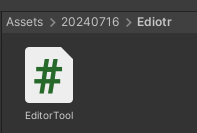
스크립트는 Editor 폴더를 만들어서 그 안에서 작성해야 한다.
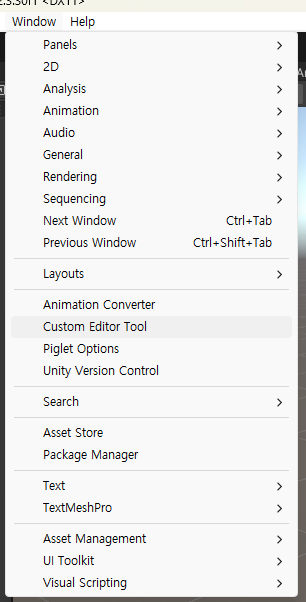
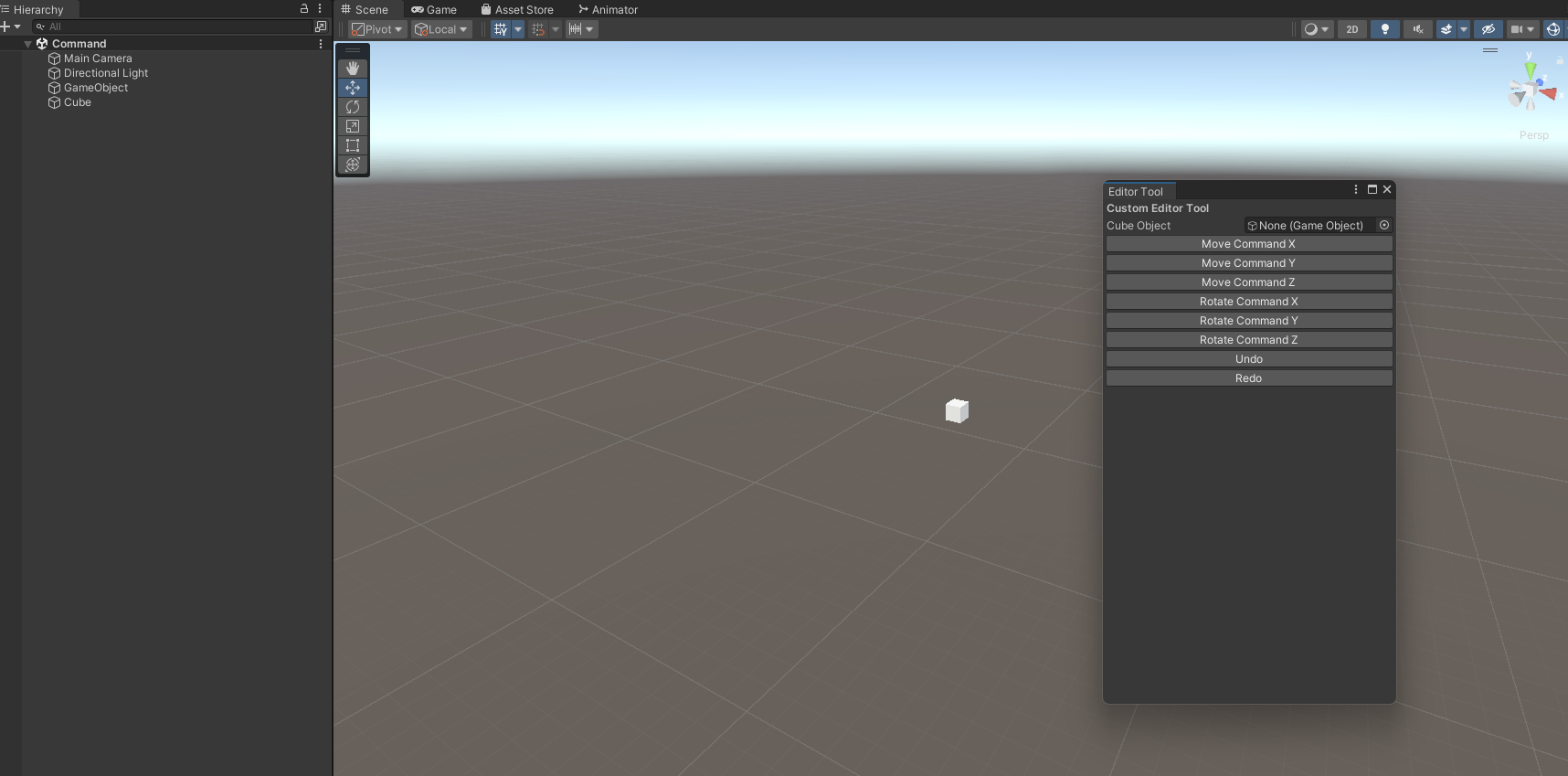
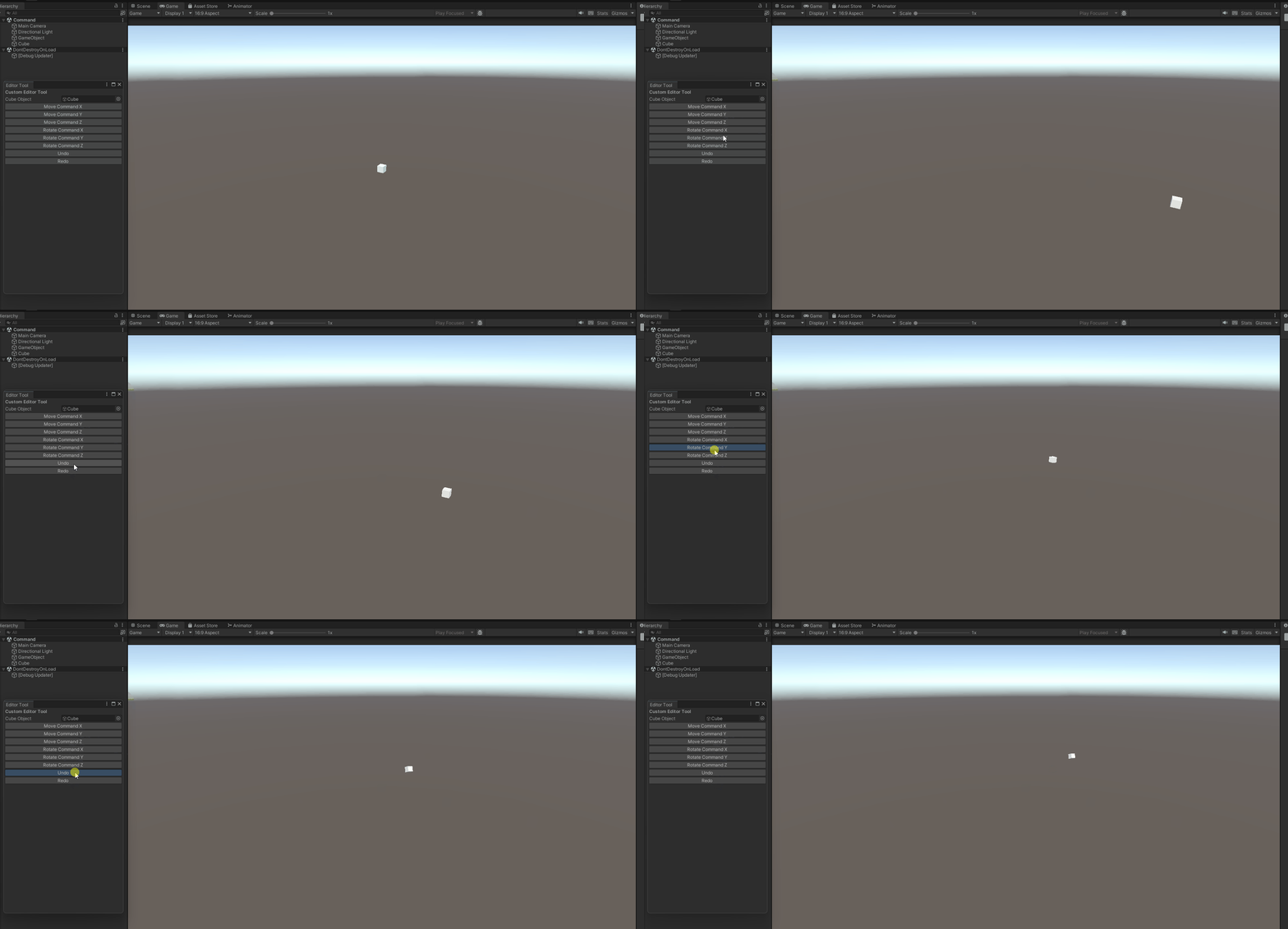
유니티에서 커맨드를 활용하여 직접 실행(Execute) 취소(Undo) 재실행(Redo)을 구현해보았다. 또한 커스텀 에디터를 만들어 해당 기능들을 연동시켰다. 커스텀 에디터는 프로젝트 관리에 용이하고 또한 사용자 정의 인터페이스를 만들 수 있어 상황에 따라 사용하면 좋을것같다.
'개인 공부 > 디자인패턴' 카테고리의 다른 글
| 유니티 옵저버 (1) | 2024.07.19 |
|---|---|
| 유니티 FSM (0) | 2024.07.17 |
| 디자인패턴 책임 연쇄 패턴 (Chain of Responsibility) (0) | 2024.07.16 |
| 디자인패턴 컴포지트 (0) | 2024.07.15 |
| 디자인패턴 프록시 (0) | 2024.07.15 |